
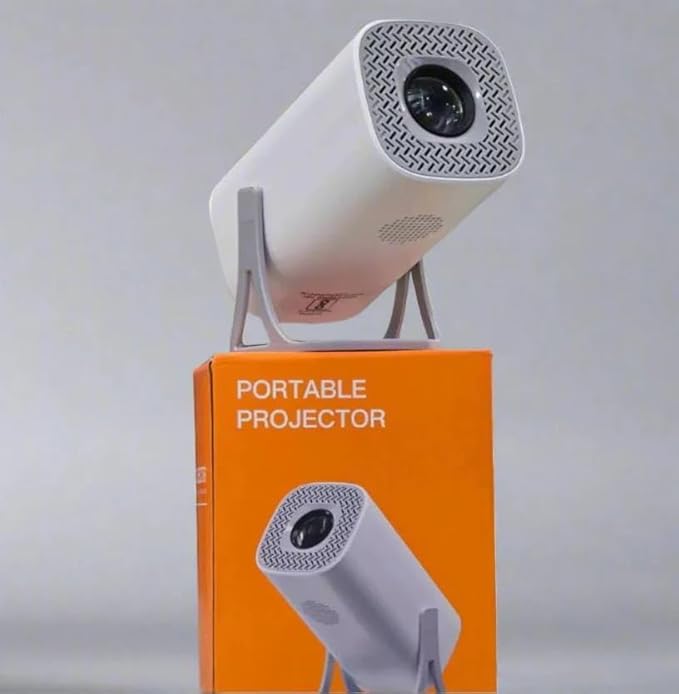
A big screen for movies, cricket and family get-togethers used to mean a large and expensive TV. Today a small smart projector can throw a 100-inch picture on a plain wall for much less money. But a projector is not right for every home. This guide compares the two honestly, so you can decide what suits your room, and explains what to check before buying a projector.
Quick answer
- Choose a projector if you mainly watch in the evening, want a really big picture, have a plain light-coloured wall, and like moving the screen between rooms or taking it outdoors.
- Choose a TV if you watch a lot in the daytime, your room gets plenty of sunlight that you cannot block, or you want something you switch on and use without any setup.
- Many families have both: a TV for daily news and serials, and a projector for weekend movies, matches and functions.
Projector vs TV: side by side
| Smart projector | TV | |
|---|---|---|
| Screen size | Adjustable, from about 40 to over 100 inches on a wall | Fixed by the model you buy |
| Cost for a big picture | Much lower than a TV of the same size | Rises steeply above 50 inches |
| Daytime viewing | Washed out in a bright room; best with curtains drawn or after dark | Clear in daylight |
| Portability | Small; move it between rooms or take it outdoors | Stays on the wall or stand |
| Setup | Needs a wall, the right distance and a minute of focusing | Switch on and watch |
| Sound | Built-in speaker is basic; pair a Bluetooth speaker or soundbar | Usually better built-in sound |
| Space | No large panel on the wall; packs away when not in use | Takes up wall or table space all the time |
What to check before buying a projector
1. How dark your room can get
This is the single most important point. Every home projector looks its best in a dim room. If you can draw the curtains or mostly watch after sunset, a projector works very well. In a room full of sunlight during the day, a TV is the better choice.
2. Brightness (lumens)
More lumens means a brighter picture. Be aware that brands measure lumens in different ways, so two projectors with the same number on the box can look different. Use the number to compare models in the same price range, and ask for a demo if you can.
3. Resolution and 4K support
“Native 1080P” means the projector actually shows a Full HD picture. “4K supported” means it can play a 4K video file or stream, not that the picture itself is 4K. For home movies and cricket, native 1080P with 4K support is a good level.
4. Distance from the wall
The further the projector sits from the wall, the bigger the picture. In a small room, check that you can get the size you want from the place you will keep it. A rotatable projector that can also point at the ceiling is handy for bedrooms.
5. Smart features and connections
A smart projector with built-in apps and Wi-Fi plays YouTube and other streaming apps without a separate device. Dual-band (2.4G and 5G) Wi-Fi gives smoother streaming. Screen mirroring lets you show your phone or laptop. Bluetooth lets you connect a speaker or headphones.
6. Keystone correction
If the projector is not exactly in front of the wall, the picture becomes a slanted shape. Auto or 4D keystone correction straightens it without moving the projector around.
Our projectors at a glance
- Smart Portable Projector, 3500 Lumens, 180° Projection: native 1080P with 4K support, preloaded streaming apps and screen mirroring, dual-band Wi-Fi, Bluetooth 5.0, auto and 4D keystone, and a rotatable design for ceiling or table-top viewing.
- Smart Portable Projector for Indoor and Outdoor Home Theater: a 40 to 130-inch picture, 5G Wi-Fi, Bluetooth and 4K support, easy to carry outdoors for family functions.
See both in our Projectors category. Prices and stock change often, so check the product page for the current price.
Tips for a great picture in a small room
- Use a smooth, white or light grey wall. A cheap white bedsheet stretched tight also works for outdoor shows.
- Keep lights off behind the screen and switch on only a small light behind the viewers.
- Place the projector on a steady table at the height of the middle of the picture, and use keystone only for small corrections.
- Connect a Bluetooth speaker or soundbar for much better sound than the built-in speaker.
- Leave space around the projector’s air vents so it stays cool, and let it cool down before packing it away.
Frequently asked questions
Can I watch cricket and YouTube on a projector?
Yes. A smart projector with Wi-Fi plays streaming apps directly, and you can also mirror your phone or connect a set-top box if it has the right ports.
Can a projector replace my TV completely?
For evening viewing in a room you can darken, yes. If the family watches a lot during bright daytime hours, keep the TV and use the projector for movies and special occasions.
Can I see a demo before buying?
Yes. Visit our store on NH-103, Kulahru, Ghumarwin, and we will show you the picture on a wall. You can also order online and pay by cash or UPI on delivery anywhere in Himachal Pradesh, with free delivery on orders above ₹1,000 and a 7-day return window on eligible products.
Leave a Reply